Back to Shop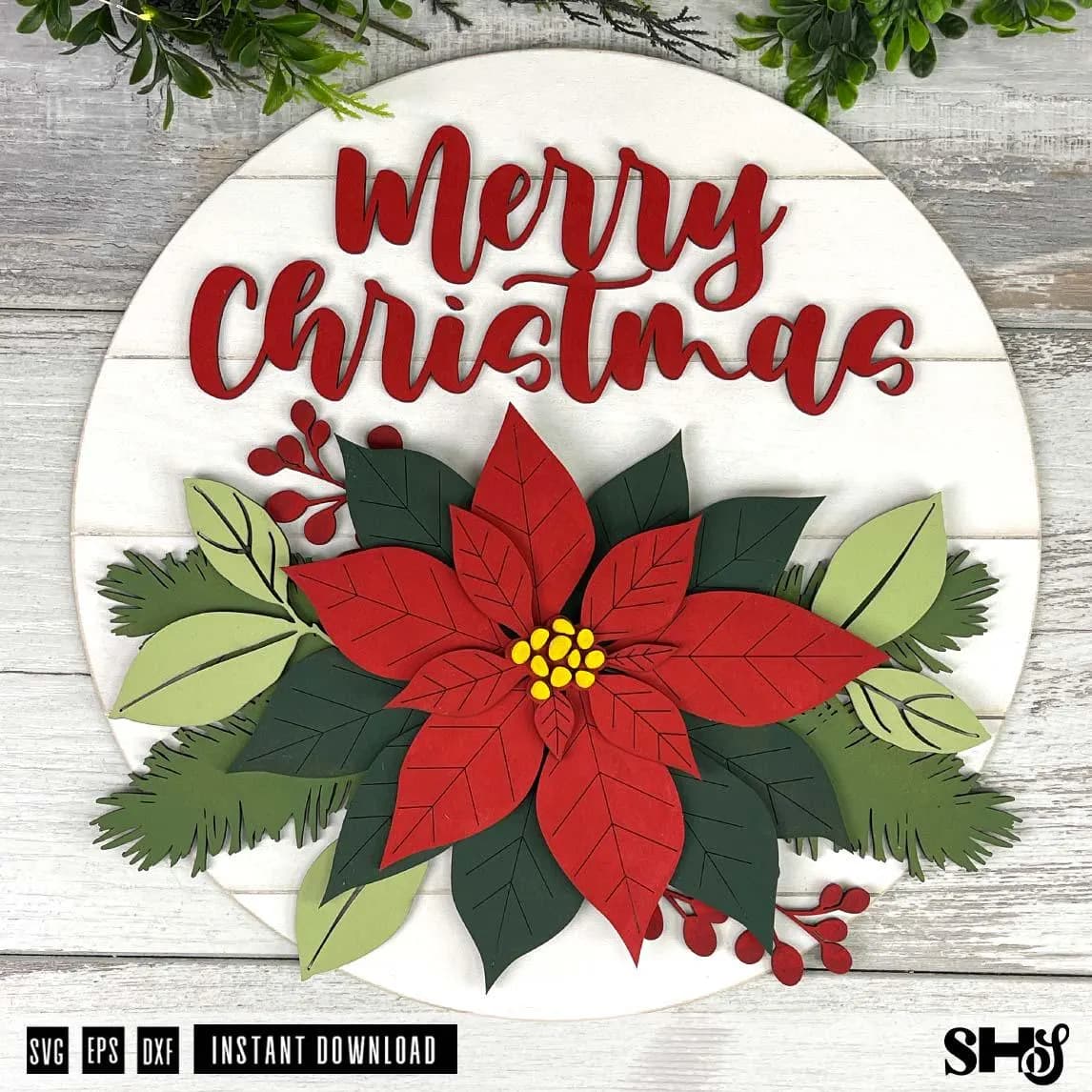
Merry Christmas Door Hanger Laser Cut SVG | Poinsettia Round | Holiday Door Hanger | Laser Cut Christmas Sign | SVG eps dxf
$3.99
christmas doorhangermerry christmas signpoinsettia signmerry christmas svgchristmas door roundlaser christmas svgfront door sign svgfarmhousechristmasfarmhouse christmaschristmas door signchristmas decor svground sign svgchristmas flowers
PLEASE READ:
This is a DIY digital laser-cut file. NO PHYSICAL PRODUCT will be shipped to the buyer.
Create a multi-layer Merry Christmas Poinsettia Sign that you can paint or stain and cut out of your material of choice. This is an SVG file (DXF & EPS included) that works with most laser-cutting machines. This cut sign has six layers. PDF directions with photos are included with your download.
This is a vector file, and the size can be changed. CHANGING THE SIZE OF YOUR SHAPEHOUSE STUDIO DESIGN. Upload all the pieces into your laser cutting software. Select all files before increasing or decreasing the size. This will keep the sign and all the pieces proportionate while resizing. This sign was designed for use at 11.6 x 11.6 inches or larger. It has not been tested for smaller sizes.
Cricut tested.
**Please note that once the file is in your laser cutting software, you must manually change the settings to tell your laser cutter to cut, engrave, and/or score. [Red = Cut; Black = Engrave; Blue = Score]
Files are created in Adobe Illustrator. Make sure your laser-cutting software, such as LightBurn, is set to import files at 72 dpi. This will ensure your files import the correct size. Go to LightBurn > preferences > file settings > then click 72 dpi - Illustrator.
The finished sign shown is cut from 3mm tempered hardboard and 3mm basswood. Size is approximately 11.6 inches by 11.6 inches. Please note that we use the XTool P2S to test and cut each file. We are not familiar with other software/hardware, but we will be more than happy to help with general design questions. Cutting times & specifications vary from machine to machine. Please check your machine’s specifications.
- All files are digital; no physical products will be delivered.
- All purchased files are non-refundable.
TERMS OF USE
Your purchase of a ShapeHouse Studio digital design includes a license for personal use and limited small-business commercial use. Copyright and ownership of all original designs remain with ShapeHouse Studio.
LIMITED COMMERCIAL USE:
Permitted products include:
- Finished physical products sold directly to customers.
- Complete DIY kits containing the ShapeHouse Studio wood pieces and the supplies needed for the customer to create the finished project, such as paint, brushes or applicators, glue, ribbon, fabric, embellishments, or other required materials.
- Adding only incidental supplies to unfinished blanks does not make them a complete DIY kit. A complete kit must include the materials reasonably necessary for the customer to create the finished project being offered or shown.
- Paint-party and workshop projects that follow the same complete-kit requirements.
Once you reach 100 physical products sold from a design, you must repurchase that design to receive a new limited commercial license for an additional 100 products.
SELLING UNFINISHED WOOD BLANKS
Standalone unfinished wood blanks are not permitted under the standard commercial license.
If you wish to sell unfinished physical blanks made from ShapeHouse Studio designs, you must purchase our separate Small Business Extended Commercial License for Wood Blanks.
The Extended Commercial License:
- Allows qualifying small businesses to sell unlimited unfinished physical blanks made from ShapeHouse Studio designs they have purchased.
- Is valid for 12 consecutive months from the date of purchase.
- Must be renewed annually to continue selling unfinished blanks.
- Does not include any SVG or digital design files. Each design must be purchased separately.
YOU MAY
- Use ShapeHouse Studio designs for unlimited personal projects.
- Create and sell permitted finished physical products within the commercial-use limits above.
- Create and sell complete DIY kits and paint-party projects that include the supplies needed to complete the project.
- Resize the entire design proportionally as needed for your physical project.
- Use permitted ShapeHouse Studio designs to create physical products for your own small business.
- Sell standalone unfinished blanks only while covered by an active Small Business Extended Commercial License for Wood Blanks.
YOU MAY NOT
- Sell ShapeHouse Studio designs as standalone unfinished blanks without an active Extended Commercial License.
- Resell, share, distribute, upload, transfer, sublicense, or give away any ShapeHouse Studio digital file or any portion of a file.
- Share files through email, cloud storage, file-sharing services, social media, online groups or forums, storage devices, or with customers, employees, contractors, friends, or family members.
- Claim a ShapeHouse Studio design, or any portion of a design, as your own.
- Alter, rearrange, combine, remove, extract, trace, redraw, recreate, or repurpose elements of a ShapeHouse Studio design to create a new design for resale or distribution.
- Use ShapeHouse Studio designs or design elements in logos, trademarks, branding, or competing digital products.
- Use ShapeHouse Studio designs for factory production, industrial manufacturing, large-scale commercial manufacturing, or unauthorized mass production.
- Use products created from ShapeHouse Studio files as props or visual assets to advertise or sell your own digital design files.
PRODUCT PHOTOS & MARKETING
You must create and use your own original product photographs and marketing images.
ShapeHouse Studio photographs, mockups, listing images, graphics, or other promotional materials may not be copied, downloaded, reproduced, or used to advertise your products.
Using AI or other editing tools to alter, restyle, recreate, enhance, remove or replace backgrounds, add or remove elements, or otherwise modify ShapeHouse Studio photographs or marketing images is also prohibited. An altered or AI-generated image derived from a ShapeHouse Studio photograph does not qualify as your own original photography.
Your product photos must originate from photographs you personally create of the physical products you produce.
DIGITAL FILE TERMS
- Your purchase is for a digital file only unless otherwise specifically stated.
- Digital purchases are non-refundable due to the nature of the product.
- The purchased file is licensed only to the purchaser and may not be transferred or shared with another individual or business.
- Purchasing a ShapeHouse Studio file does not transfer copyright or ownership of the design.
- Any use not specifically permitted by these terms requires written permission from ShapeHouse Studio.
- By purchasing or downloading a ShapeHouse Studio digital file, you agree to comply with these Terms of Use.
- Questions about licensing or a specific intended use are always welcome. Please contact ShapeHouse Studio before proceeding with any use that is not clearly covered above.
ALL RIGHTS RESERVED © SHAPEHOUSE STUDIO, LLC
This product is an instant digital download containing the following four (4) file formats:
-SVG
-DXF
-EPS
*Plus PDF of full color directions with diagrams and photos.
Red: Cut
Black: Engrave
Blue: Score
To restate, this is an INSTANT DOWNLOAD.
These are digital cut files. No physical item will be shipped.
For more information about our product license, please visit our website. https://shapehousestudio.com/about
The files are available immediately for download after purchase. You will receive an email with a download link. For more information on how to download your files, please see https://www.etsy.com/help/article/3949
Please make sure your machine/software can work with one of the above file formats before you purchase.
Files will be in a zip (compressed) folder. Make sure to extract files before trying to access files (right click zip folder, select "extract all..." and select destination folder, the desktop is usually easiest). If you need any help with unzipping, extracting, or using these files, please contact me. If you are having trouble viewing your SVG, please refer to this video: www.youtube.com/watch?v=WvnmIEZHAfY